Picture an online abaya store in Jeddah: the developer switches on product filters, and Search Console suddenly shows 4,000 indexed URLs on a 300-product site. If you have typed “what is canonical tag” into Google after a mess like this, this guide is your answer.
What is canonical tag, in one line? A line of HTML in a page’s head section telling search engines which URL is the official version when duplicate or near-duplicate pages exist — consolidating ranking signals onto one URL so your pages stop competing with each other.
Most Saudi business websites have canonical problems they have never heard of — quietly leaking rankings. Below: how canonical tags work, when to use them over a 301, how to add them in WordPress, the nine mistakes that break them, and how to audit yours. All facts verified October 2026.
What is a canonical tag? The short, honest answer
Asking what is canonical tag in plain English? It is a signal in a page’s HTML head telling Google and Bing: “of all the URLs showing this content, treat this one as the official version.” Introduced by Google, Bing, and Yahoo in 2009, it remains the standard way to handle duplicate content.
The part most guides bury: a canonical tag is a hint, not a directive. Google weighs it alongside your links, sitemap, and redirects, and can override it when signals disagree. “Canonical” means the authoritative version: the one true copy your site wants ranked.
How does rel=”canonical” actually work?
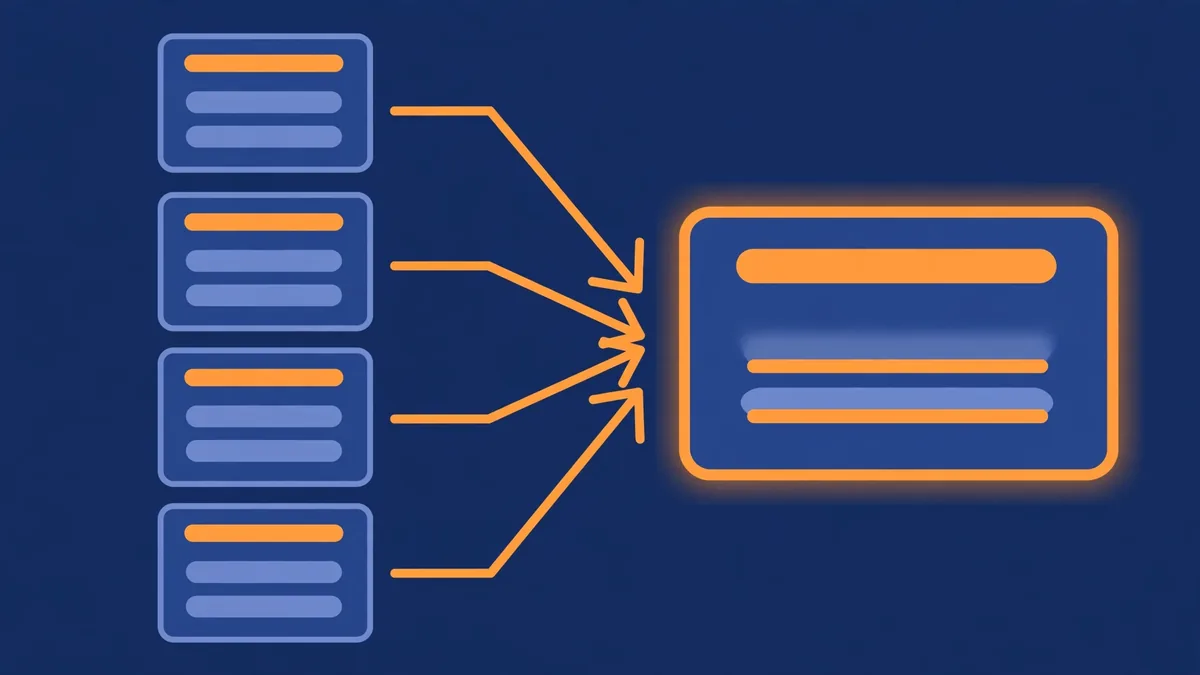
To understand what is canonical tag mechanics, picture Google’s process: when its crawler finds duplicate or near-duplicate pages, it groups them into a cluster and picks one representative — the canonical URL — for search results. Your rel="canonical" tag nominates that representative, and Google consolidates the cluster’s signals onto it.
Without it, Google may split link equity across five versions of your page, rank the wrong one (like the ?utm_source=instagram version), or waste crawl budget on filter URLs. Two rules protect crawl efficiency: use canonicals only when duplicates must stay live — the tag is invisible to visitors and speaks only to search engines.
The 7 duplicate content problems canonical tags fix
Most people researching what is canonical tag are really asking when they need one. Modern sites generate extra URLs automatically — filters, tracking links, archives, variants — and each becomes a page Google might index. The seven most common situations for Saudi sites, and where your canonical should point below:
| Situation | Example | Canonical points to |
|---|---|---|
| Tracking parameters | /sale?utm_source=instagram | Clean URL, no parameters |
| Product filter combinations | /abayas?color=black&size=m | Main category page |
| WWW vs non-WWW | www.site.com vs site.com | Your chosen domain version |
| HTTP vs HTTPS | http:// vs https:// | The secure HTTPS version |
| Trailing slash variants | /blog vs /blog/ | Your consistent URL format |
| Print/AMP versions | /page?print=true | The standard page |
| Syndicated content | Same article on Medium | The original on your site |
The first two rows are where Saudi e-commerce bleeds rankings: a Jeddah store on Salla or Zid can generate thousands of parameter URLs from a few hundred products. One absolute canonical per variant, pointing at the clean category URL, consolidates everything and avoids duplicate-content penalties. For www/http/slash rows a 301 is cleaner; for syndication, a cross-domain canonical pointing home stops a partner copy outranking you.
Canonical tag vs 301 redirect: which do you need?
The what is canonical tag vs 301 question has a simple answer: a canonical tag keeps both URLs live for visitors, while a 301 redirect permanently sends visitors and search engines to the new URL. Canonical when both URLs must exist; 301 when the old URL should never be visited again.
The standard 2026 framework — see Scandiweb’s duplicate content guide — is three fixes for three situations: 301 redirect when the duplicate has no purpose (trailing-slash variants, HTTP migration, deleted pages); canonical tag when the duplicate must exist but should not rank (filters, variants, tracking URLs); meta robots noindex when the page must exist for users but never appear in search. Never combine canonical and noindex — the noindex can leak onto your target.
How to add a canonical tag in WordPress, Shopify, and custom sites
Once you know what is canonical tag theory, implementation is next. In WordPress, Rank Math and Yoast add self-referencing canonicals automatically and let you override them per page individually. In Shopify they are built into theme templates. On custom sites, add the link element manually inside each page’s head section.
Start with the hygiene baseline: every indexable page should carry a self-referencing canonical — a tag pointing to its own URL. It locks in your preferred URL format and protects you when scrapers or tracking links create variants. For a custom canonical in Rank Math, use the Advanced tab’s Canonical URL field with an absolute URL. For Salla and Zid stores, canonical handling lives in platform templates — parameter filters without canonicals are a template fix for your developer.
The 9 canonical tag mistakes that quietly break your SEO
Knowing what is canonical tag syntax is not enough, because these tags fail silently — your pages stay live while rankings quietly drift. The nine mistakes below cause nearly every canonical failure found in real technical audits, and each one either contradicts your tag or teaches Google to distrust it. Audit your own site against all nine.
- No self-referencing canonical. No tag leaves the choice entirely to Google. Add one to every indexable page.
- Canonical + noindex together. Conflicting signals; the noindex can leak to the canonical target. Pick one.
- Canonical pointing at a redirect. The target must return a 200 status, not a 301 — avoid redirect chains.
- Relative instead of absolute URLs.
/page/breaks across protocols. Use the full URL. - Multiple canonical tags on one page. Duplicate plugin or theme output makes search engines guess — keep exactly one per page.
- Canonicalizing to a 404. Consolidating signals into a dead page destroys them. Audit targets quarterly.
- Paginating everything to page 1.
/page/2/and/page/3/should canonicalize to themselves unless truly duplicate. - Internal links contradicting the tag. Links pointing to
/abayas?sort=popularwhile the canonical says/abayas/get the tag ignored. Consistency is everything. - Expecting instant results. Canonicals are reprocessed at crawl time — weeks for deep pages on large sites. Our results disclaimer explains why SEO works in timelines, not guarantees.
How to audit your canonical tags (with a Jeddah deep-dive)
A what is canonical tag audit has two halves: find the problems with a crawler, then confirm exactly what Google actually chose inside Search Console. The gap between your intended canonicals and Google’s chosen ones is your prioritised fix list — work through it starting with your highest-traffic money pages.
In Search Console’s Pages report, watch “Duplicate without user-selected canonical” — Google telling you it picked the canonical itself — and “Alternate page with proper canonical tag,” confirming your tags worked. Then crawl with Screaming Frog: check for missing canonicals, targets that redirect or 404, multiple tags, relative URLs, and canonicals disagreeing with your sitemap. Fix broken first, consistency second.
Why a Jeddah fashion store should audit before White Friday
Imagine a Jeddah abaya store six weeks before White Friday: marketing launches filter landing pages, the ads team appends UTM parameters everywhere, and a theme update adds a parameter format. By November, Google has indexed 4,000 URLs for 300 products. A September audit — self-referencing canonicals verified, filters canonicalized to the clean category, UTM variants out of the sitemap — prevents the cascade. Canonical hygiene is core on-page SEO work — cheapest before peak season, as our internal linking guide shows for the linking side.
Canonical tags and AI search in 2026
The newest reason to care what is canonical tag about: these tags now speak to AI crawlers too. GPTBot, OAI-SearchBot, and the systems behind Google’s AI Overviews build retrieval indexes from the same web you optimise for Google, and your canonical tag tells each one which URL is worth citing.
When an AI Overview cites a source, it cites one URL. With messy canonical signals, the AI may cite your ?print=true version or a staging subdomain. As MSangeetha’s 2026 guide notes, canonical strategy is now AI-search citation infrastructure. The practice is unchanged: one absolute canonical in the head, self-referencing everywhere, custom canonicals only where duplicates must exist, quarterly audits — see also our keyword research guide.
Frequently asked questions
What is canonical tag, in simple terms?
A canonical tag is a one-line HTML instruction in a page’s head section naming the official URL when the same content exists at multiple addresses. It tells search engines to treat one version as the master copy and consolidate all ranking signals there. Visitors see no change. Every indexable page should have one, even if it only points to itself.
ما هو الوسم الكانونيكال؟ (ma huwa al-wasm al-kanonikal — “what is the canonical tag”, MSA)
الوسم الكانونيكال هو سطر برمجي يُوضع في قسم الـ head من الصفحة لتحديد الرابط الرسمي عند وجود نسخ مكررة من المحتوى. تخبر هذه الإشارة محركات البحث بأن تعتمد نسخة واحدة كالمرجع الأساسي وتجمع إشارات الترتيب عليها. استخدم دائمًا رابطًا مطلقًا كاملًا يبدأ بـ https، وتأكد دائمًا من أن كل صفحة قابلة للفهرسة تحمل وسمًا صحيحًا يشير إلى نفسها على الأقل.
Does every page need a canonical tag?
Yes — every indexable page should carry a self-referencing canonical tag pointing to its own URL. This is baseline hygiene, not optional optimisation. It locks in your preferred URL format and protects you when scrapers, tracking links, or sloppy internal links create variants. Rank Math adds these automatically — but verify they actually render in your page source by searching for rel=”canonical”.
Can I put two canonical tags on one page?
No — exactly one canonical tag per page. Duplicate plugin or theme code sometimes outputs two tags, and then search engines guess which to honour or ignore both. If your crawler reports multiple canonicals, find the second source — usually a theme template conflicting with your SEO plugin — and remove it carefully. W3Era’s canonical guide flags this in audits.
Does a canonical tag pass link equity like a 301?
Mostly yes, with one caveat: Google treats canonicals as a strong hint and consolidates signals onto the canonical URL, similar to a 301. But a 301 is a directive Google must follow, while a canonical is a preference it can override when signals disagree. For permanent URL changes the 301 remains stronger; for duplicates that must stay live, use the canonical.
Why is Google ignoring my canonical tag?
Google overrides canonicals when your signals conflict. The usual culprits: internal links pointing somewhere other than the canonical, a noindex on the same page, the canonical target redirecting or erroring, or the pages being too different to count as duplicates. Use URL Inspection to see Google’s chosen canonical, then align every signal — links, sitemap, hreflang — with your choice.
Should the canonical URL have a trailing slash?
It must match whichever format you chose as your standard — the canonical tag has to agree with your internal links and sitemap. If your site uses trailing slashes, the canonical should too; if not, it should not. The specific choice matters less than consistency. Pick one format, enforce it across canonicals, links, redirects, and sitemap, and never mix them.
Can I point a canonical tag to a different domain?
Yes — cross-domain canonicals are legitimate and built for syndicated content. If your article is republished on Medium or a partner site, a canonical on the copy pointing to your original URL tells Google that you are the source. Confirm that the partner’s CMS renders your canonical tag — a stripped tag leaves you competing against your own syndicated copy.
How long does it take Google to respect a new canonical tag?
It depends entirely on crawl frequency — days for popular pages, several weeks for deep or rarely crawled URLs on large sites. Canonicals are reprocessed when Google recrawls the page, so there is no fixed timeline. Speed it up by requesting re-indexing in Search Console and keeping your sitemap clean. As with all SEO timelines, expect ranges rather than exact dates.
The bottom line
So what is canonical tag, in the end? The simplest duplicate-content insurance your site can buy: one line of HTML naming the official URL. Add self-referencing canonicals everywhere, use absolute URLs, never mix canonicals with noindex, keep links consistent, and audit quarterly.
For most Saudi businesses the fix list is short: verify your SEO plugin outputs canonicals, canonicalize filter URLs to clean category pages, and audit before peak season — White Friday for e-commerce, Ramadan for Makkah hospitality.
Prefer it handled? Our on-page SEO service includes a full canonical and technical audit — see what it costs on our pricing page, starting with a one-time SEO audit from SAR 1,200.
Written by Mohammad Muttiullah, Founder of EazyRankSEO. Mohammad leads technical SEO strategy for businesses across Riyadh, Jeddah, Makkah, and Madinah. About our team.